Claude Cowork

In early 2026 Anthropic released Claude Cowork, which broke headlines as it was a more general-purpose AI agent, rather than the hitherto coding agents which Anthropic were famous for. This product had actually famously been produced by their coding agent, Claude Code, in just 10 days! That alone was newsworthy but in addition to that it was promised that this would allow the powerful Anthropic agentic AI systems which were previously only accessible within Claude Code (a technical tool for developers) to be used by non-technical users through a much more friendly user interface and experience.
It was originally launched on macOS and also only within the more expensive plans on the Anthropic ecosystem. As such I wasn't able to get started with it straight away but I'm pleased to say that we are now all on Claude Max plans here internally, which means that we get access to Claude Code and, most importantly for today's newsletter, Claude Cowork.
What is Claude Cowork?
Many of you will be familiar with Claude Code, given its rise to fame in 2025 but as previously mentioned the issue with Claude Code is that it is ultimately a developer tool. It runs on the command line and whilst it is extremely powerful once you get to know it, it can be somewhat daunting to get started, especially for non-technical users.
On the other hand Claude Cowork was created to bridge that gap and allow some of the agentic features possible within Anthropic's products to become more widely available. It is a general-purpose business/productivity agentic system that is optimised for integrations with the likes of business applications and allows you to very quickly automate many aspects of day-to-day business life.
What do you use it for?
This was my first question. Having used Claude Code extensively over the last few months, I wanted to know what things I could do with Claude Cowork that were not possible within Claude Code. In fact, this was the wrong way of thinking about this problem. If you're familiar with Claude Code then many (but not all) of the features and functionality which are in Claude Cowork will not be novel, but it's simply allowing people who don't have access to Claude Code or have used it in the past to be able to begin doing this.
As such I have found that for most use cases Claude Cowork can do many of the same things as Claude Code, minus obviously the more coding-heavy functions. I've actually extended my use of Claude Code to a lot more than coding, using it for doing research, extensive formatting / document creation, scripting, etc., etc. All of that is still very possible within Claude Cowork.
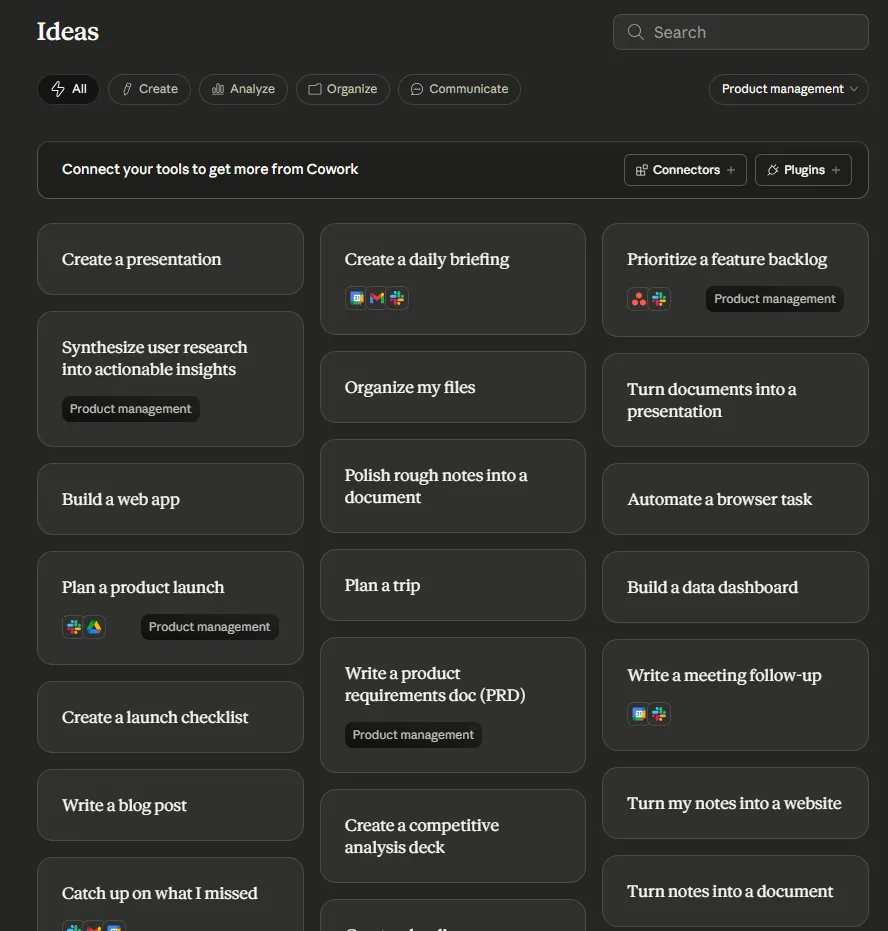
Thankfully this is clearly a problem which many people face when staring at Claude Cowork for the first time and so, belatedly, I realised that they have an 'ideas' tab in their UI which allows you to get started with lots of potential ideas.
How did it perform?
I wanted to get started with something which was going to be genuinely useful to me and to see how it handled various elements of scripting, task automation, etc. I decided to start with the use case of doing a daily scour of the internet for what has happened the previous day in AI and AI security. This obviously serves the purpose of helping me with my newsletter but also for generally running an AI security business.

Before getting started with the task it first asked me clarifying questions. This is very positive as this is something that we've been doing for a while using Claude Code: intentionally asking it to prompt us for further details that it is unsure about before getting started with a piece of work. This greatly increases the usefulness and accuracy of the information that it then goes on to produce.

However, one of the things which is frustrating to me is that they have not implemented a good way of responding to questions within the user interface. You still have to type out your answers for each of these. I like what they've done now within Claude Code, where they have a separate question dialogue prompt, which allows you to select from several answers or provide your own and iterate through those before continuing on in a nice, streamlined manner.
To do this task it immediately started using skills which I have torn feelings over. On one hand this is good to maximise productivity, but on the other hand using skills is a potential security concern if those skills are not trustworthy. My assumption here is that they are, and that these are from Anthropic's own skill set database. I also couldn't click on the skill to learn more about it or check it.
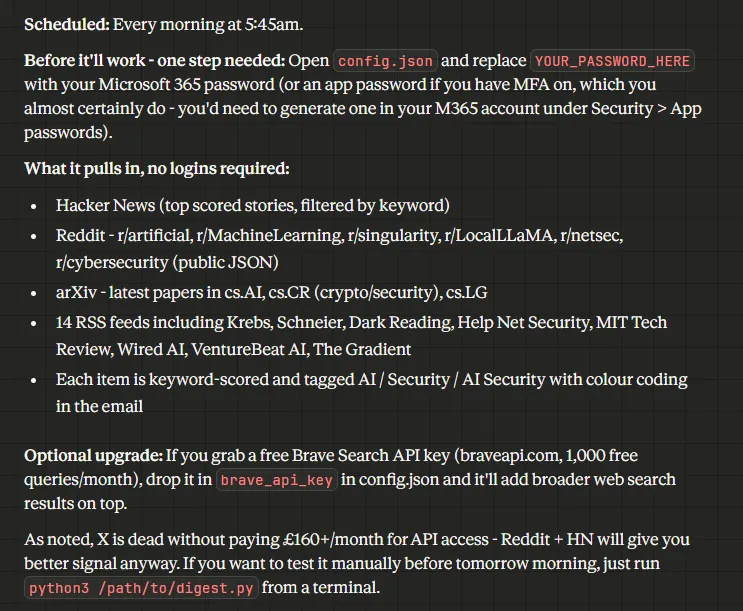
Running the Python script to test it out found that it seemed to work very well. To clarify this is not required for the actual running of the script. This is simply just to test if it worked in the first instance. Non-technical users would not need to do this; they would just have to wait a day for the script to run, or just ask Claude Cowork to test the script itself.
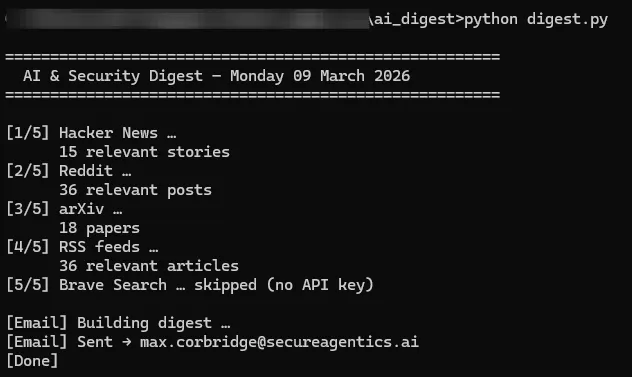
After some fiddling with my email settings we got there - note, this fiddling would probably put off a non-technical user.
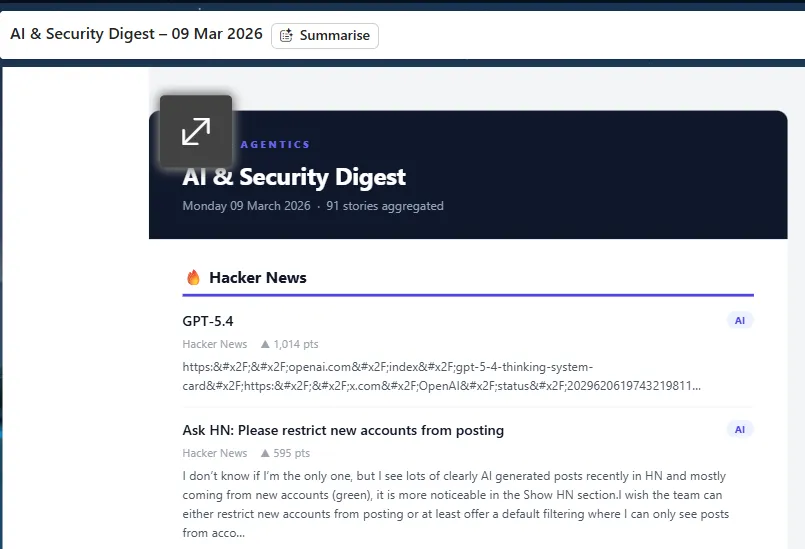
Overall, I think it handled this pretty well and I was impressed, but not blown away as this wasn't something that Claude Code wouldn't have handled just as well or actually probably better. This is where I started to go a bit deeper into what particularly Claude Cowork could do that Claude Code didn't. One of the things that it told me was that it was very much built around Microsoft 365 integration. Now, we use Microsoft 365 internally and I had previously used the ChatGPT <> Microsoft 365 connector to see how it would handle interacting with the M365 ecosystem. In short it did absolutely terribly.
There was no way of specifying which M365 service I wanted ChatGPT to use. If I was trying to get it to refer to a particular document I couldn't link to that in any intuitive way. When I give the name of the file it would start searching through all of the wrong SharePoint sites and every file before eventually it would sometimes, or sometimes not, find the file that I called out specifically by name or even gave it the direct link to. Overall I disabled it within about 24 hours.
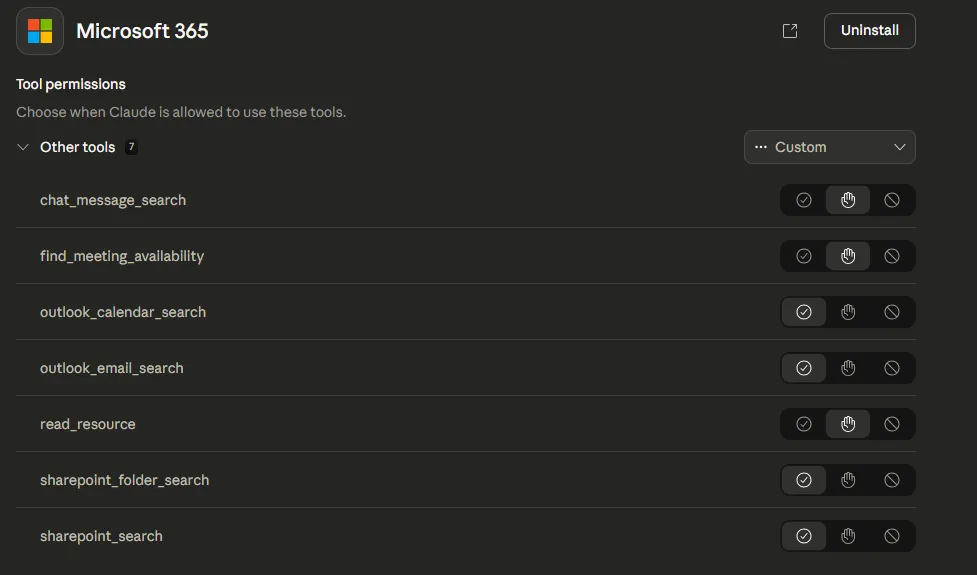
So, I decided to be the guinea pig yet again for connecting AI to business services and to see how it was going to handle it. It's worth noting here that the teams plan allows you to opt out for things like model training, etc. Although I don't love handing over business data to AI providers, there are some assurances that you get on this plan, including a much more granular view of permissions you are allowing:
The first task I gave it was to go through emails related to a particular event and make sense of them. The context here is that over the past few weeks I have received many invitations and emails from various parties around our upcoming trip to RSA at the end of March. I asked Cowork to go through all emails related to RSA and to group them in terms of event invitations, if I had responded or not, invitations to meet directly with investors or potential customers, etc., and find a way of making sense of the emails, which I had not had time to look through.
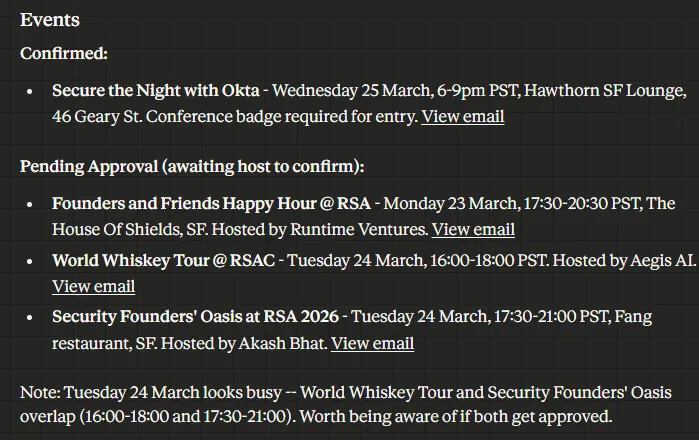
This was far more impressive and seemed to intuitively understand email chains (thank god as email chains in Outlook are horrid!). It was not just able to draw out information on them but also to make some analysis and critical thinking on these, such as pointing out at the bottom that there is an overlap between two events that are both pending approval, and that I should be aware there might be an overlap.
It seemed to me that this was going to be most useful in an M365 setting and I wanted to push it to do something which it almost certainly wasn't going to be able to do. On a side note, this something that we try to do every day here at Secure Agentics to maximise what is possible with AI tools and to constantly push the boundary.
As such I told it simply to 'prepare for every meeting today'. Now, the meetings I had that day were not very well explained in the calendar. Some of them were clearer, some of them were not, some of them were investor calls, some of them were just catch ups with my co-founder, some of them were engineering calls. As such it would be very hard for it to really understand the full context of what those meetings are and to effectively prepare for them but I wanted to see how it was going to handle the task.
I can't share the screenshot on here as its a ton of investor calls and interviews, but it did very well. Connecting the dots, finding email histories that led to calls and updating you on how warm the investors seemed, doing some background research into the VCs themselves for context, etc. Impressive.
One frustration that is shared with the ChatGPT experience though is that there still doesn't seem to be a native way of calling out specifically which site or file you would like it to read. This means that you're going to be spending a lot more tokens on searching through entire sites based off loose keyword or native language or confusion between files with similar names, which is frustrating.
Claude code handles this well with its @ symbol, which allows you to directly call out particular files. Unlike ChatGPT it actually did find the right files and again pulled out the relevant information and then gives you links to those files to be able to click and go directly to them. It's an improvement on that.
Over the next few days I used Claude Cowork for all of my standard AI tasks, whether that were simple queries or automated scripting or deep research or whatever it may be. The one feature I found myself turning back to time and time again was the easy way of synthesising M365 data, and particularly working with long, forgotten email threads. I find the Outlook search experience terrible for identifying information in these and I've already used it several times this week to simplify finding information from those email chains and presenting it back, as well as providing me with a link to the direct email.
Finally, I gave it a task that I've tried with many other AI tools which have generally failed terribly which is to create a slide deck. This deck needed to be created from scratch, based off a branded template I had, using extremely specific information that existed across about 8 different files. I cannot share with you the output, but it was the most impressed I've been with what AI was able to achieve in quite some time. I can absolutely see myself continuing to use this.
Conclusion
Overall my thoughts are that there is nothing necessarily new or unique to Claude Cowork, except for potentially how it handles M365 integrations, which makes sense given that it's a more business productivity application than a coding one. In fact there are many tasks where Claude Code will go a lot deeper than Cowork.
So why do I still think Cowork is brilliant? It gives non-technical users a way of getting started with agentic AI and getting the benefits that we've all been using for many months now with Claude Code. That is very powerful as having recently walked through a setup of Claude Code for a non-technical user, there are many things which are assumed knowledge in how you can get the tool running and how it works. You just need to be making this slightly more accessible for non-technical users who can get started with this and I think they've done that well with Claude Cowork.



Bake Security into your agent pipeline.