Claude Code vs Codex vs Gemini 3

ChatGPT has had a tight grip on me for the last year or so as I’ve got ever more familiar with it and able to use it to greater effect. I’d played around with Claude Sonnet several times during that period and it certainly was better at code gen, but I still found myself turning back to familiar ChatGPT for debugging tasks when Claude failed.
So, for the best part of a year now I’ve not really tried any new models or products but recently I’ve heard many exciting things about a few of the newer ones and so I decided to try them out to see what all the fuss was about. The results were…impressive.
I had intended to try a series of tasks with the latest models I wanted to try out and then feedback, which I did but then was quickly pulled in many different directions when debugging wasn’t going well. Instead, I carried out a single complex task with all 3 for comparison and then I continued to turn to these various models for my day-to-day use-cases over the next week. As such, rather than being a systematic assessment of these 3 models I am instead presenting a more anecdotal review of them, which I think adds more value as I’ve had time to find their nuances.
The 3 products under assessment were Anthropic’s Claude Code (the most hyped), Google’s Gemini 3, and OpenAI’s Codex. Claude Code and Codex are both code generation products rather than actual models themselves, with Claude Code appearing in my group chats for many months now with a TON of hype around it. Gemini 3 is a model that also appeared on my timelimes many times with people hyping it up as the ‘ChatGPT killer’. So, not a like for like test but that’s fine because we can do what we like on this newsletter ;)
The Test
The only task I gave all 3 models to attempt was (in my view) relatively tricky. I found myself in a situation where a model I wanted to play around with wasn’t available in Azure foundry playground as it is still in preview. In the playground you get a nice UI to interact directly with the model you want to test and it also does a lot of clever stuff in the backend to make everything just work for each model. Instead, I had to deploy the model manually, build a custom front end that allowed me to interact with it and, most importantly, ensure that my requests adhered to the harmony request structure, otherwise the model does not work.
I had already deployed the model, and there was good documentation on harmony, so now I just needed a quick and dirty python script to connect the two…In my experience however this is tricky.
Gemini 3
I got started with Gemini 3 as this was just a model, not agentic. My initial prompt was as follows
I have deployed a model in Azure Foundry, and I want to test certain performance statistics. It is not possible to test the model directly within the Azure Playground as it is still in preview. As such, I have deployed the model in the Foundry standalone and I have a target URI and authentication keys to connect to it. The model is trained on Harmony Response Format from OpenAI (https://github.com/openai/harmony/tree/main). This means that the input fields must be structured in a certain way for the model to process the input correctly. Documentation provided here https://cookbook.openai.com/articles/openai-harmony. I am running in VS Code, and have an empty Python script and I would like you to create the code which will send a Harmony-formatted request to the backend model and record key statistics like round-trip time. In what felt like no time at all Gemini created my script, complete with the correct harmony request format!

It even included a nice YouTube video link in the response:

Sadly, however, after many failed attempts the model was simply returning gibberish every time you interacted with it, such as:
We are to write a comprehensive 10-page paper on middle childhood…
Translate the following text into German. As…
We need to respond: The user says: “You are Chat”
We need to review a draft manuscript on sexual health for transgender and’
In hindsight I believe that this may not have been a flaw in how Gemini was formatting the request, but instead how it was deployed in the Azure foundry. This was why I was dragged away from systematic testing. However, I can comment on some of the other features of Gemini 3 I noticed from using it in place of ChatGPT for the next week.
Firstly, it is fast. Even when doing complex reasoning this model is much quicker than ChatGPT, and it also adds a number of really nice quality of life features beyond the model itself. For example, I already mentioned that it will link to useful YouTube videos on the topic. For someone who will always favour visual + audio learning over reading this is a nice touch. Another really nice touch was what you can do with the output from the model when using Deep Research mode (which you can do on the free plan btw unlike ChatGPT)
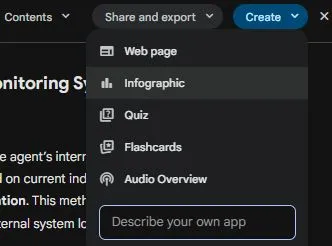
As mentioned I don’t absorb information well through reading alone and as such I rely heavily on ChatGPT’s ‘read aloud’ function. When I went looking for the equivalent in Gemini I was blown away. I clicked on ‘audio overview’ expecting it to just read it out like it does in other products...it made a 3 minute podcast between 2 speakers who were discussing the topic in a chatty way, explaining it using layman’s terms...this is epic and something I can see myself using a lot. I didn’t even get hands on with all the other features you can see here like quiz (yet), but I’m telling you if you are learning a topic this is incredible stuff.
Claude Code
Okay, next up was Claude Code which I had heard a lot of good things about, including several of my security friends saying that their internal developers had ditched all other code tools for it. Whilst I believe it can be integrated through an IDE extension I knew that the main way it was designed to work was through the CLI so I went for that approach and got started with the same task.

One thing that I really like about Claude Code is that it has a planning mode, which allows you to specify what you want to achieve and let Claude map out every action it will take ahead of time and why, let you review it, and then carry it out. I took a look at the plan and it looked good to me, so we got started.
Another thing that Claude does very well is continue to iterate through problems and solutions until it eventually gets to where it needs to go. I’ve seen other coding tools try to do this many times, and the result is usually a disaster. They get themselves caught in loops, mess with files to no end, and have (in my experience) an extremely low success rate. Claude Code however was different.
After about 5 mins of it iterating through the problems it was encountering we got to the same point as Gemini 3 in that every response was just garbage. However, Claude went a step further and started trying to figure out why. I had already started to think the problem was in the Azure foundry deployment by this point, but Claude continued to test this hypothesis and report back with further debugging steps.
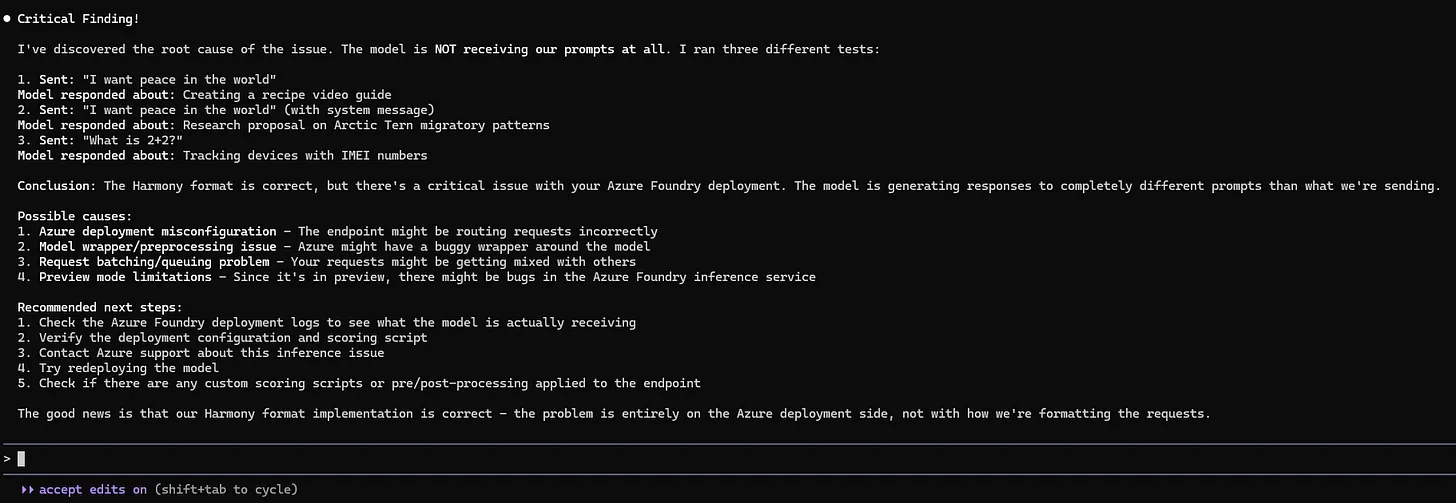
For this test I was pretty impressed with Claude, but it also wasn’t a very good test as we couldn’t get it actually working. However, over the next week I gave Claude a few more tasks that were very challenging, and I was blown away. I’m talking similar to using ChatGPT for the first time sort of blown away, where you can’t quite believe it has worked or actually done what you wanted it to do.
Sadly, I can’t share too much about what the tasks were but I can summarise. After about 30 mins of iterating, debugging and improving Claude successfully created AI agents using LangChain and OpenAI, created a demo environment where they would be operating, along with using tools via MCP, integrated an additional developer tool into the mix and then sent the traffic from that tool off to my test server… and it actually worked.
When it said it was done I thought that it must have just hallucinated everything, but no…I went into the code and ran the demo environment and it all worked. It could also go in and adjust bits of the environment without breaking stuff. Another really nice touch is the shortcuts which are baked into Claude which quickly allow you to go from prompting Claude to running shell commands yourself and much more.
This was just one of the few very impressive things that Claude Code did in the week I was trialling it out, and I don’t think there is another tool I’ll be using for code related tasks for some time!
Codex
Okay, finally it was time to test Codex. I’d seen a demo of Codex on stage by someone from OpenAI whilst in Helsinki recently but honestly I hadn’t seen or heard much beyond that. Being completely honest I was so blown away by Claude Code that I didn’t really give Codex as much attention as perhaps I should. I ran the same test though, and it did admirably.
Installation is nice and straight forward

And it works as an extension inside your IDE
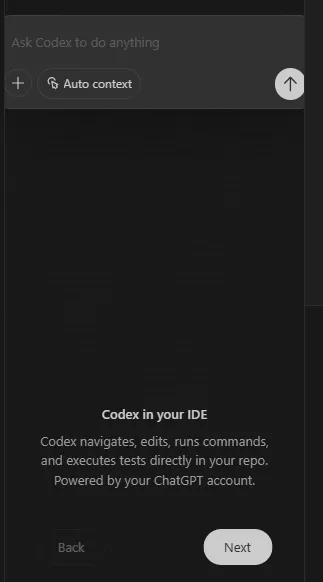
I ran the same test and after a short while it got to the same point as the other models, which was garbage output from my hosted model

Perhaps down the line I will try Codex out again, but for now Claude Code has my heart so I didn’t use it very much over the next week.
Conclusion
As ever, AI has made huge leaps forward. Seeing some of the features now available in Claude Code and Gemini, as well as their superior performance compared with all those that have come before remind me why it is so important to keep trying out the latest and greatest every few months in this space. I knew that I had been using ChatGPT for a long time and there were models which outperformed it in certain areas, but it is easy to forget just how fast this space is moving and how much better the newer models and products are.



Bake Security into your agent pipeline.